Promptvara icon

OpenArt Creative AI Suite Review & Platform Breakdown

OpenArt Creative AI Suite is an all-in-one platform that brings AI image, video, audio, editing, character, and storytelling tools into one workspace. Its standout tools include Director, which helps turn an idea into a structured multi-scene video; Worlds, for creating consistent environments; and the Character System, for keeping characters recognizable across images and scenes.

Creative AI Suite OpenArt Logo

OpenArt

What it does: Bundles top AI image, video, and audio tools into one single subscription.
Main features: AI image, video, and audio creation.
Standout tools: Director, Worlds, Character System
Templates: Films, ads, social content
Node-based workflows: No

* This is an affiliate link at no extra cost to you and helps keep Promptvara alive and growing.

What’s inside this guide:

  1. Interface and ease of use: See how OpenArt organizes its tools, models, templates, and guided workflows.
  2. Standout tools: Explore Director, Worlds, the Character System, and OpenArt’s guided storytelling features.
  3. OpenArt Director: See how its guided filmmaking tool turns an idea into a connected multi-scene visual story.
  4. Our experience and community feedback: Learn why we use OpenArt and what other creators and users say about the platform.
  5. Free plan and pricing: Review the free trial, paid plans, credits, and how OpenArt’s pricing system works.
  6. Tools and capabilities: See the main image, video, audio, editing, character, and production tools available.
  7. AI models in OpenArt: Discover selected image and video models and learn where to find the complete current selection.

Interface & ease of use of the OpenArt Creative AI Suite

OpenArt keeps its main AI image, video, and audio tools and models visible in the left sidebar, making it easy to move between different parts of the platform and quickly find your way back to the tools you need.

Creators who prefer more control over what they create can use their own prompts and settings and work directly with many of the most popular AI image and video models, while templates and guided workflows provide a quicker starting point for those who prefer a simpler process.

Standout tools overview

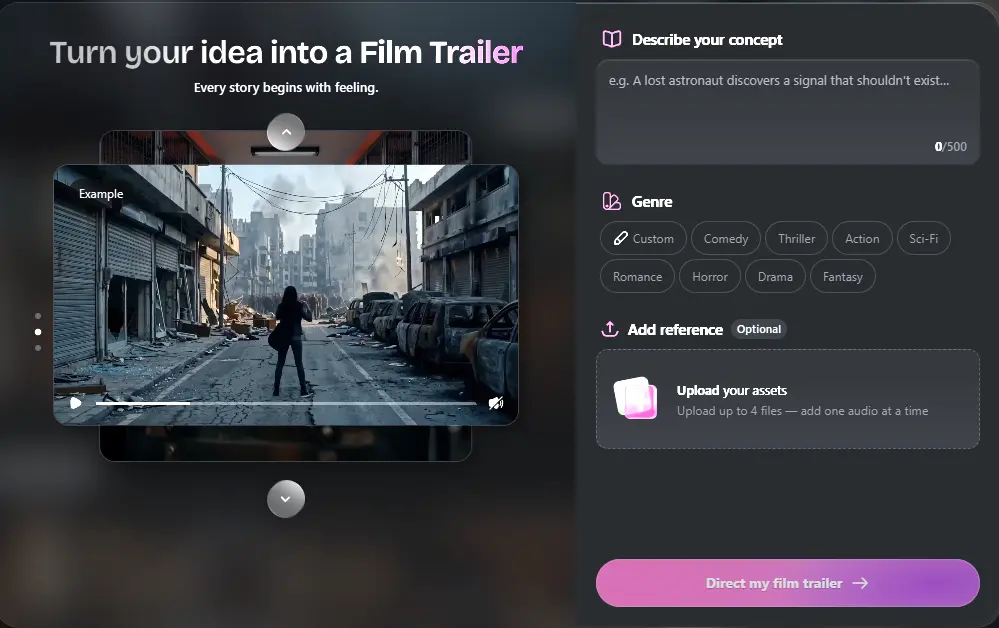
OpenArt Director is one of the platform’s main standout tools, helping turn an idea into a structured multi-scene video with options for genres and reference material.

Worlds lets creators build recurring environments, locations, and visual settings, helping maintain the same atmosphere across multiple scenes. The Character System creates reusable consistent characters and helps keep their appearance recognizable throughout different images and scenes.

OpenArt offers many more creation and editing tools, but these three are especially useful for building consistent stories, advertisements, explainers, and other larger visual projects rather than only separate images or short clips.

OpenArt Director: Create complete visual stories

Start with a concept, select a genre, and optionally add reference images, video, or audio. Director helps develop your idea into a connected multi-scene video, making it easier to create trailers, advertisements, explainers, music videos, and other visual stories.

OpenArt creative ai suite director tool

Why we use OpenArt

At Promptvara, we mainly use OpenArt for direct AI image and video generation, image editing, Motion Sync, Lip-Sync, and other focused production tasks. Having many popular models and practical editing tools inside one workspace makes it useful for our website content, tutorials, YouTube videos, and client projects.

We usually prefer to create and control individual shots ourselves, but OpenArt also provides guided tools for creators who want more help developing characters, scenes, and complete visual stories. This makes it a good fit for both hands-on creators and those who prefer a more guided workflow.

What the community says

Creators and reviewers regularly praise OpenArt for its broad model selection, approachable image and video generators, flexible editing tools, and strong character and storytelling features. Switching between models is generally considered easy, while tools such as Director, Worlds, and the Character System are often highlighted for larger visual projects.

Some users mention that the growing number of tools and workflows can take time to fully explore, and organizing or returning to older generations is not always as immediate as they would like. Results in more complex character and multi-scene projects can also require some experimentation, which is common across current AI creative platforms.

Free plan & pricing

OpenArt offers a free trial with 40 one-time credits, available for seven days without requiring a credit card. This is enough to explore the interface and test roughly up to 40 image generations, depending on the models and settings you choose. Free video generations are not currently included.

Paid plans use a monthly credit system across OpenArt’s image, video, audio, character, and Director tools. The current individual plans are:

  • Essential: $14 per month with 4,000 credits
  • Advanced: $29 per month with 12,000 credits
  • Infinite: $56 per month with 24,000 credits
  • Wonder: $240 per month with 106,000 credits and unlimited creation with selected models

Annual billing lowers the effective monthly price, while higher plans provide more credits, parallel generations, characters, and production capacity. The number of images or videos you can create depends on the model and settings used, as more advanced generations usually require more credits.

Prices, credit allowances, and included features can change, so check OpenArt’s current pricing page before choosing a plan.

Tools & capabilities

OpenArt includes the main tools you would expect from a Creative AI Suite, including AI image and video generation, image and video editing, upscaling, background replacement, video relighting, Lip-Sync, Motion Sync, voice-over, music, and sound effects.

Beyond these core capabilities, OpenArt provides more specialized tools for multi-view image generation, region-protected VFX editing, reusable characters and worlds, and guided projects for short films, advertisements, music videos, explainers, and other multi-scene content.OpenArt regularly adds new tools and updates existing ones. Visit the platform to explore its complete current tool selection, or compare its capabilities with the other Creative AI Suites included in this guide.

AI models in the OpenArt Creative AI Suite

OpenArt brings a large and frequently updated selection of AI image and video models into one workspace. Current image options include GPT Image 2, Nano Banana 2 and Nano Banana Pro, Seedream 5.0 Pro, and FLUX.2. Its video selection includes models such as Seedance 2.5, Kling 3.0, Veo, Wan 2.7, and PixVerse.

OpenArt also provides dedicated audio and performance tools for voice-over, music, sound effects, Lip-Sync, and Motion Sync. These sections include additional models and generation modes that are organized separately from the main image and video selectors.

These are only a few of the most recognizable current options. OpenArt also includes many additional models, earlier model versions, and specialized creation modes across its Image, Video, Audio, Lip-Sync, and Motion Sync tools. Model availability changes regularly, so use the Find every current model card to explore the complete live selection.


Find every current model

Open Image or Video from the left sidebar on OpenArt, then use the model selector inside the creation panel. For voice-over, music, Lip-Sync, and Motion Sync options, open the relevant dedicated tool.