Promptvara icon

Magnific Creative AI Suite Review & Platform Breakdown

Magnific Creative AI Suite is an all-in-one platform that brings AI image, video, audio, design, 3D, stock assets, and creative workflows into one workspace. Its standout tools include Spaces for visually connecting different generation steps, Flows for building repeatable creative processes, and Designer for combining AI-generated and uploaded content in editable layouts.

Creative AI Suite Magnific Logo

Magnific

What it does: Bundles top AI image, video, and audio tools into one single subscription.
Main features: AI image, video, and audio creation.
Standout tools: Spaces, Flows, Designer
Templates: Ads, design, video, social content
Node-based workflows: Yes

* This is an affiliate link at no extra cost to you and helps keep Promptvara alive and growing.

What’s inside this guide:

  1. Interface and ease of use: See how Magnific organizes its models, creative tools, assets, templates, and guided workflows.
  2. Standout tools: Explore Spaces, Designer, the Magnific Image Upscaler, and the platform’s wider production features.
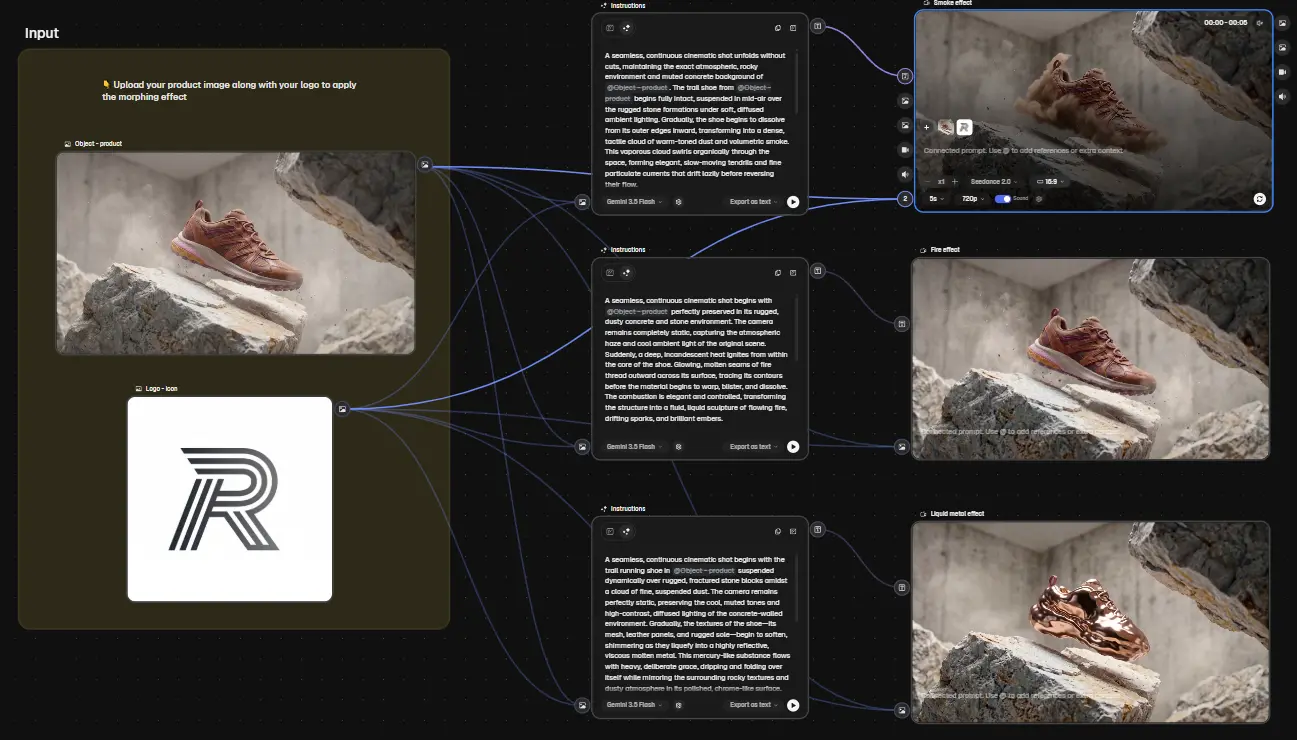
  3. Magnific Spaces: See how its visual node-based canvas connects different generation, editing, media, and production steps into reusable workflows.
  4. Our experience and community feedback: Learn why we use Magnific and what other creators and users say about the platform.
  5. Free plan and pricing: Review its limited free access, paid plans, annual credits, and unlimited generation options.
  6. Tools and capabilities: See the main image, video, audio, design, upscaling, editing, 3D, and workflow tools available.
  7. AI models in Magnific: Discover selected image, video, and audio models and learn where to find the complete current selection.

Interface & ease of use of the Magnific Creative AI Suite

Magnific keeps its main creation areas visible in the left sidebar, making it easy to move between Spaces, image, video, audio, and its other tools. The homepage feels relatively calm and provides direct access to the main sections, while the All Tools view gives a broader overview of everything available.

Creators who prefer more control can work directly with prompts, settings, and individual AI models, while templates, use cases, and ready-made workflows provide a quicker starting point for those who prefer a guided process. These options are slightly less prominent than the main tools, but become easy to find once you know where the Use Cases section is located.

Standout tools overview

Spaces is one of the platform’s main standout tools, providing a node-based canvas where image, video, audio, text, stock assets, and editing steps can be connected into reusable creative workflows. Once a workflow is ready, it can be published as a simpler Flow, allowing others to run the same process through clearly defined inputs without working with the underlying nodes.

Designer combines a flexible multi-page design canvas with layers, typography, vector elements, images, templates, and AI editing tools. The Magnific Image Upscaler can either enhance an image with newly generated visual detail or increase its resolution while staying closer to the original.

Magnific offers many more generation, editing, design, and production tools, but these three show how the platform supports connected workflows, editable visual layouts, and high-resolution image enhancement.

Spaces: Build reusable node-based workflows

Start with a blank canvas or a template, then connect image, video, audio, text, stock, and editing nodes into a visual production process. Spaces lets creators build repeatable multi-step workflows in one place, while finished workflows can be published as simpler Flows that others can run without navigating the complete node setup.

magnific creative ai suite spaces node based workflows

Why we use Magnific

At Promptvara, we mainly use Magnific for direct AI image and video generation, image enhancement and upscaling, design work, and testing connected production workflows inside Spaces. Its combination of leading models, editing tools, and creative assets makes it useful for our website content, tutorials, YouTube videos, and other visual projects.

We generally prefer to control individual generations ourselves, while Spaces gives us a more visual way to connect prompts, references, images, videos, audio, and editing steps into reusable workflows. Designer is useful when those generated assets need to be combined with typography and layouts, while the Magnific Upscaler helps prepare images for larger and more detailed final outputs.

What the community says

Creators and reviewers regularly praise Magnific for its extensive model selection, professional image-upscaling tools, large creative-asset library, and relatively approachable interface. The ability to move between image, video, audio, design, editing, and workflow tools within one platform is also frequently highlighted.

Some users mention that the growing number of tools, models, assets, and different creation areas can take time to fully explore. Spaces makes node-based workflows more accessible, but building more advanced connected processes still requires some learning and experimentation. Results can also vary between models and settings, particularly when using creative upscaling or more complex editing tools.

Free plan & pricing

Magnific offers a free plan with limited daily access rather than a monthly credit balance. Free users can currently create up to 20 AI images per day with selected in-house models and test a smaller collection of basic image tools. Advanced models, video generation, audio creation, and several professional editing features require a paid subscription.

Paid plans use credits across Magnific’s image, video, audio, design, upscaling, editing, and workflow tools. The current individual plans are:

  • Premium: $20 per month, or $14.50 per month billed annually, with 240,000 annual credits
  • Premium+: $45 per month, or $33.75 per month billed annually, with 600,000 annual credits and unlimited creation with selected models
  • Pro: $280 per month, or $210 per month billed annually, with 4 million annual credits and additional high-volume benefits

Annual subscribers receive their complete credit allowance for the year rather than a monthly reset. Higher plans provide more credits, unlimited access to selected models, additional upscalers, commercial music rights, extra-credit purchases, and greater production capacity. The number of images, videos, or audio generations you can create depends on the model, resolution, duration, and settings used.

Prices, credit allowances, unlimited models, and included features can change or vary by region. VAT and local taxes may also apply, so check Magnific’s current pricing page before choosing a plan.

Tools & capabilities

Magnific includes the main tools you would expect from a Creative AI Suite, including AI image, video, and audio generation, image and video editing, image and video upscaling, background removal and replacement, image expansion, generative editing, relighting, camera changes, Lip-Sync, voice-over, music, and sound effects.

Beyond these core capabilities, Magnific provides more specialized tools for connected node-based workflows, multi-page visual design, mockups, icons, reusable characters and styles, cinematic shots, video projects, 3D generation, 360-degree product views, collaborative production, AI agents, plugins, and access to a large collection of stock images, videos, vectors, templates, and other creative assets.

Magnific regularly introduces new tools and updates existing ones. Visit the platform to explore its complete current tool selection, or compare its capabilities with the other Creative AI Suites included in this guide.


AI models in the Magnific Creative AI Suite

Magnific brings a large and frequently updated selection of leading AI image, video, and audio models into one workspace. Current image options include Seedream 5.0 Pro, Nano Banana 2 and Nano Banana Pro, GPT Image 2.0, FLUX.2 Pro and FLUX.2 Max, Krea 2, Recraft V4.1, and Luma Uni-1.1.

Its video selection includes models such as Flux 3 Video, MiniMax H3, Google Omni Flash, Seedance 2, Kling 3.0, Veo 3.1, Wan 2.7, PixVerse 6, and MiniMax Hailuo 2.3. Audio options include models and systems such as Google Lyria 3, ElevenLabs Music Generation, voice-over, and sound-effect generation.

These are only a few of the most recognizable current options. Magnific also includes many additional models, earlier model versions, specialized editing modes, Motion Control options, and its own Creative and Precision upscaling technologies. Model availability changes regularly, so use the Find every current model card to explore the complete live selection.

Find every current model

Open Image, Video, from Magnific’s main navigation, then open the model selector inside the relevant generator. Each section displays the complete current selection available for that type of creation, including different model versions, resolutions, and generation modes.

Some models and technologies are organized inside dedicated tools such as Spaces, Cinematic Shot, Speak, Video Relight, Motion Control, 3D tools, and the Magnific Image or Video Upscalers. Open All Tools to find these specialized options and see any additional models available inside them.