Promptvara icon

Dzine Creative AI Suite Review & Platform Breakdown

Dzine Creative AI Suite is an all-in-one platform that brings AI image and video creation, editing, character, lip-sync, and design tools into one workspace. Its standout tools include Multi-Character Lip-Sync for making several characters speak in one scene, Consistent Character for keeping the same character across images, and Instant Storyboard for turning an idea into a visual sequence.

Creative AI Suite Dzine Logo

Dzine

What it does: Bundles top AI image, video, and audio tools into one single subscription.
Main features: AI image, video, and audio creation.
Standout tools: Multi-Character Lip-Sync, Instant Storyboard
Templates: Styles, characters, design
Node-based workflows: No

* This is an affiliate link at no extra cost to you and helps keep Promptvara alive and growing.

What’s inside this guide:

  1. Interface and ease of use: See how Dzine organizes its projects, models, creation tools, templates, and guided workflows.
  2. Standout tools: Explore Multi-Character Lip-Sync, Consistent Character, Instant Storyboard, and Dzine’s character-focused features.
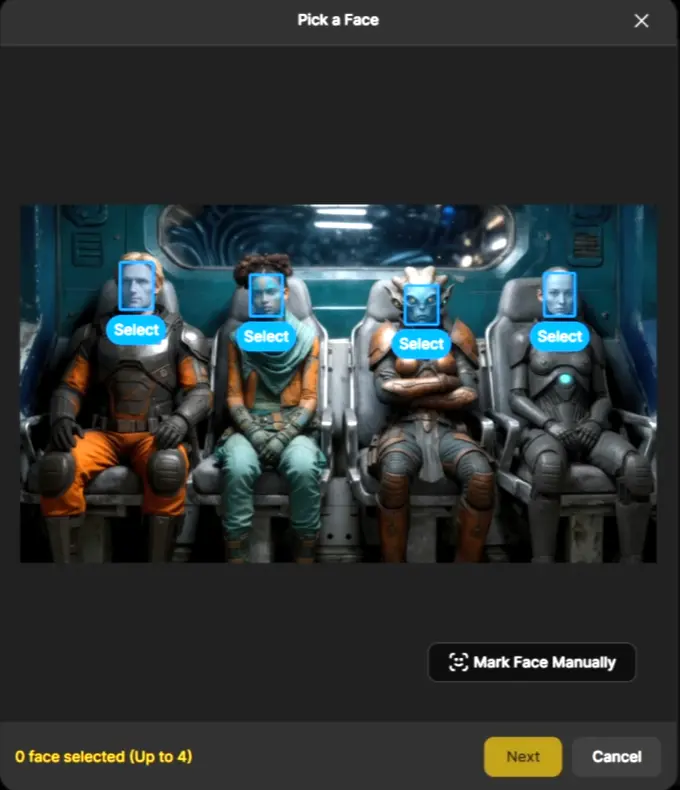
  3. Dzine Multi-Character Lip-Sync: See how several characters can speak independently within the same image or video scene.
  4. Our experience and community feedback: Learn why we use Dzine and what other creators and users say about the platform.
  5. Free plan and pricing: Review its introductory credits, paid plans, and how Dzine’s unified credit system works.
  6. Tools and capabilities: See the main image, video, editing, character, Lip-Sync, voice, and production tools available.
  7. AI models in Dzine: Discover selected image and video models and learn where to find the complete current selection.

Interface & ease of use of the Dzine Creative AI Suite

Dzine keeps its main sections visible in the left sidebar, making it easy to move between projects, generated assets, and its collection of AI tools. The homepage also provides direct access to AI image and video creation, Motion Control, Lip-Sync, and several popular tools without overwhelming the screen with too many options.

Creators can work directly with prompts, settings, and individual AI models, while templates, styles, and guided tools offer a quicker starting point for those who prefer a simpler process. Dzine organizes much of the work inside projects, which is useful for keeping related assets together, although it may take a little time to adjust if you are used to seeing all your generations in one large gallery.

Standout tools overview

Multi-Character Lip-Sync is one of the platform’s main standout tools, allowing up to 4 characters within the same image or video to speak with independently synchronized mouth movements.

Consistent Character helps creators build reusable characters and maintain recognizable features across different images, poses, styles, and scenes. Instant Storyboard provides a quicker way to turn an idea or reference material into a connected set of visual frames for planning stories and scenes.

Dzine offers many more image, video, and editing tools, but these three are especially useful for creating conversations, recurring characters, storyboards, and other character-focused visual projects.

Multi-Character Lip-Sync: Create conversations between multiple characters

Upload an image or video containing up to 4 characters and add the dialogue you want them to speak. Dzine synchronizes their mouth movements within the same scene, making it easier to create conversations, interviews, group scenes, explainers, and character-based videos without producing each speaker as a separate clip.

dzine creative ai suite multi character lip sync tool

Why we use Dzine

At Promptvara, we mainly use Dzine for Multi-Character Lip-Sync, consistent-character work, direct AI image and video generation, and focused editing tasks. These tools are especially useful for our tutorials, YouTube videos, website content, and creative experiments involving conversations and recurring characters.

Dzine combines direct control through prompts, models, and settings with guided tools for storyboards, character creation, editing, and talking-character videos. We particularly value the ability to build several characters into one scene and synchronize their dialogue without having to create every speaker as a completely separate video.

What the community says

Creators and reviewers regularly praise Dzine for its approachable interface, broad collection of image and video tools, Multi-Character Lip-Sync, and features for creating reusable characters. Its combination of model access, editing tools, and character-focused workflows is often highlighted by creators producing stories, explainers, animation, and talking-character content.

Some users mention that results can vary between models and that character consistency, Lip-Sync, editing, or upscaling may occasionally require additional attempts. More complex scenes involving several characters, movements, and voices can also take some experimentation, which remains common across current AI creative platforms.

Free plan & pricing

New Dzine users currently receive 100 one-time credits after signing up, allowing them to explore the interface and test a limited selection of tools and models. These introductory credits are valid for 12 months, although trial availability and access may differ depending on location and account eligibility.

Paid plans use one unified monthly credit balance across image, video, and other AI tools. The current individual plans are:

  • Beginner: $8.99 per month with 1,000 credits
  • Creator: $24.99 per month with 6,000 credits
  • Master: $59.99 per month with 9,000 credits and unlimited image generation with selected models under the fair usage policy
  • Master Pro: $149.99 per month with 30,000 credits and unlimited image generation with selected models under the fair usage policy

Annual billing lowers the effective monthly price, while higher plans provide more credits, storage, saved characters, concurrent generations, upscaling options, and access to additional models and tools. The number of images or videos you can create depends on the model, duration, resolution, and settings used.

Prices, credit allowances, free offers, and included features can change, so check Dzine’s current pricing page before choosing a plan.

Tools & capabilities

Dzine includes the main tools you would expect from a Creative AI Suite, including AI image and video generation, image and video editing, upscaling, background removal and replacement, generative fill, face replacement, Motion Control, Lip-Sync, text-to-speech, talking avatars, and image enhancement.

Beyond these core capabilities, Dzine provides more specialized tools for Multi-Character Lip-Sync, reusable consistent characters, Instant Storyboards, conversational image editing, reference-based video creation, product visuals, style training, image-to-3D conversion, and multi-character storytelling.

Dzine regularly adds new tools, models, and editing options. Visit the platform to explore its complete current tool selection, or compare its capabilities with the other Creative AI Suites included in this guide.

AI models in the Dzine Creative AI Suite

Dzine brings a large and frequently updated selection of AI image and video models into one workspace. Current image options include Nano Banana 2 and Nano Banana Pro, Seedream 5.0 and Seedream 4.5, Midjourney, GPT Image, FLUX.2, Qwen Image, and Ideogram 4.0. Its video selection includes models such as Seedance 2.0, Kling 3.0, Veo 3.1, Hailuo, Grok Imagine 1.5, and Gemini Omni Flash.

Dzine also provides dedicated tools and generation modes for Motion Control, Lip-Sync, Multi-Character Lip-Sync, dialogue, text-to-speech, talking avatars, reference-based video, keyframe generation, and conversational image editing. Some models are therefore available inside specialized tools rather than only through the main image and video generators.

These are only a selection of the most recognizable current options. Dzine also includes many additional models, earlier model versions, its own generation models, and specialized creation modes across its different tools. Model availability changes regularly, so use the Find every current model card to explore the complete live selection.

Find every current model

Open AI Image or AI Video from Dzine’s homepage or left sidebar, then open the model selector inside the generation panel. This lets you browse the complete current selection available for that type of creation, including different model versions and generation modes.

Some models are organized inside dedicated tools such as Chat Editor, Video Modify, Reference-to-Video, Keyframe Video, Motion Control, and Lip-Sync. Open the relevant tool to see any additional models and options available for that specific workflow.